The best chat widgets for websites in 2026 come in three kinds: free live chat (tawk.to, HubSpot, Crisp), paid live chat priced per seat (Text, Zendesk, Olark) and AI chat widgets that answer first (Aivastark, Intercom Fin, Chatbase). Which one is best for you depends less on the feature list than on two questions: who answers the chat, and how the bill grows when more people use it.
We compared 12 tools. Every price below was read off the vendor's own pricing page on 16 October 2026, in US dollars, on yearly billing where the vendor offers it. One disclosure before you read on: we make Aivastark, one of the 12. Each section says plainly where another tool is the better buy, and the decision guide near the end sends plenty of readers elsewhere.
Key takeaways
- Decide who answers first, then pick the tool. Free live chat, paid live chat and AI chat widgets solve the same problem with different labour and very different bills.
- tawk.to is still the strongest free chat widget. It is free with unlimited agents and chats; $29 a month removes its badge and another $29 adds its AI Assist add-on.
- Seat pricing grows with your team. For three people, entry plans run from $0 (tawk.to) to $165 a month (Zendesk Suite Team), before any AI usage.
- The AI line is where bills split apart. Intercom Fin charges $0.99 per outcome, Text sells AI resolutions in packs of 50 for $49.50, Olark charges a flat $400 a month for unlimited AI, and Aivastark includes 5,000 AI reply credits in its $39 plan.
- Removing the vendor's badge costs extra on most tools: $29 a month on tawk.to, $1,188 a year on Chatbase, and the Scale plan ($319 a month) on Aivastark.
What is a website chat widget?
A website chat widget is the small chat window in the corner of a web page that lets a visitor send a message and get an answer without leaving the page. Behind it sits an inbox where your team replies, an AI agent that replies for you, or both. In 2026 most widgets also pull in WhatsApp, Instagram and Facebook Messenger, so one inbox covers every channel.
The tools look alike on a web page but they are built for three different jobs:
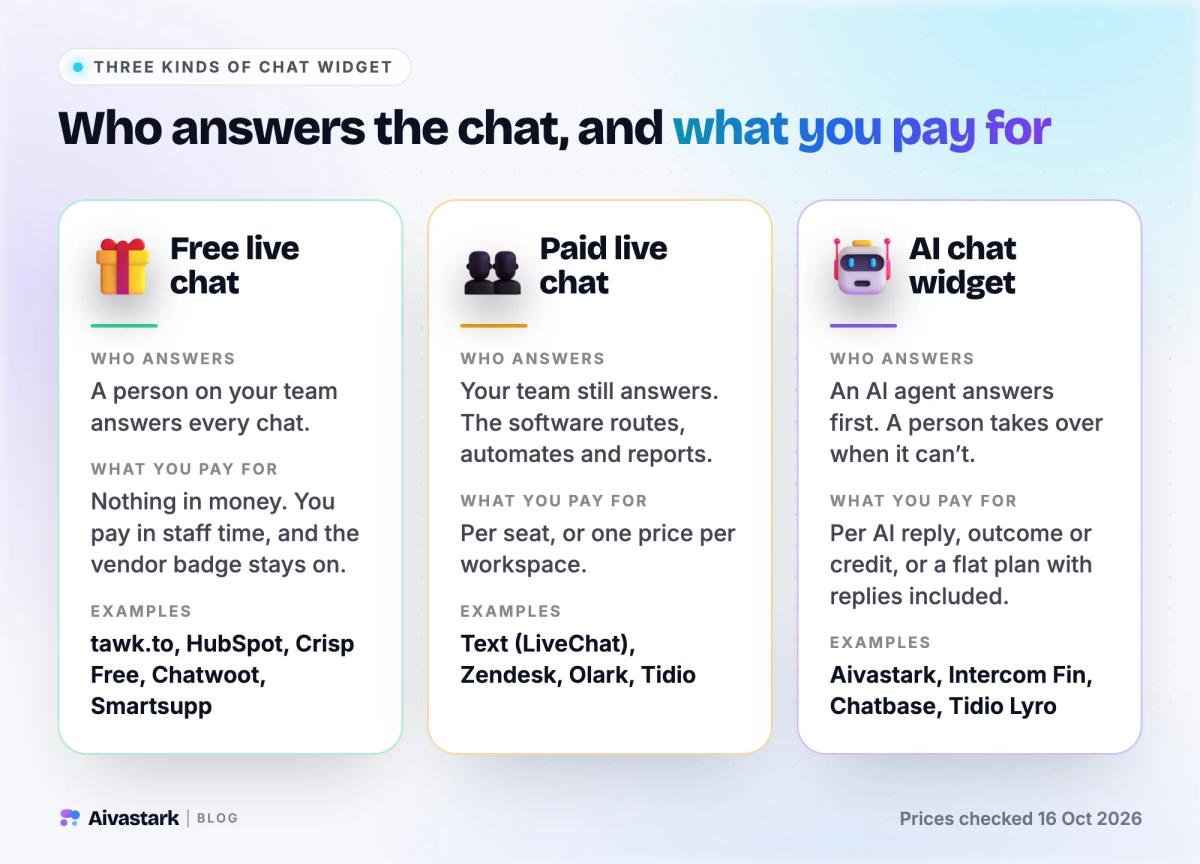
- Free live chat: a person on your team answers every chat. You pay in staff time, and the vendor's badge stays on.
- Paid live chat: your team still answers, and the software adds routing, automation and reporting. You pay per seat or per workspace.
- AI chat widget: an AI agent answers first and hands over to a person when it can't. You pay per AI reply, per outcome or per credit, or a flat plan with replies included.
If you are still deciding between a person and a bot, our AI chatbot vs live chat guide compares cost per conversation and response times.
The best chat widgets for websites at a glance
| Tool | Kind | Free plan | Paid plans from | How the AI is billed | Best for |
|---|---|---|---|---|---|
| tawk.to | Free live chat | Yes, unlimited agents and chats | $29/mo add-ons | AI Assist add-on, $29/mo | A $0 budget |
| HubSpot | Free live chat + CRM | Yes, up to 2 users | $20/seat list ($7 on promo) | Customer Agent on Service Hub Professional | Teams on HubSpot CRM |
| Crisp | Free + paid live chat | Yes, 2 seats | $45/mo per workspace | AI credits in each paid plan | Small teams who want one price |
| Chatwoot | Open-source live chat | Yes, 2 agents, 500 conversations | $19/agent/mo | Captain AI credits | Owning your data |
| Smartsupp | Free + paid live chat | Yes, 1 operator, 25 conversations | $17/mo | AI reply assists; Mira AI agent sold separately | WhatsApp and Messenger on a free plan |
| Text (LiveChat) | Paid live chat | No, 14-day trial | $19/user/mo | 10 AI resolutions included, then $49.50 per 50 | Sales chat and Shopify stores |
| Zendesk | Help desk with chat | No, 14-day trial | $55/agent/mo (Suite Team) | Per automated resolution | Support teams working tickets |
| Tidio | Live chat + AI add-on | Yes, 50 conversations | $24.17/mo | Lyro AI, from $32.50/mo for 50 conversations | Small online stores |
| Olark | Live chat + AI agent | No, 14-day trial | $29/agent/mo | $400/mo flat, unlimited AI | Unlimited AI at a fixed price |
| Aivastark | AI chat widget | Yes, 300 AI credits/mo | $12/mo | Flat plan, replies included | An AI agent first, at a flat price |
| Intercom Fin | AI agent + help desk | No, trial | $29/seat/mo + $0.99 per outcome | Per Fin outcome | Teams already on Intercom |
| Chatbase | AI chatbot builder | None listed; 7-day trial | $32/mo (Hobby) | Message credits, $40 per 1,000 extra | Choosing your own AI model |
How we picked and priced these tools
We started from the tools people most often shortlist for a website chat widget and kept the 12 that publish their prices. We left out tools that only quote through sales. For each one we opened the live pricing page in a browser on 16 October 2026 and read the rendered page, because several vendors draw their prices with JavaScript and a plain fetch sees nothing. We recorded:
- The free plan, and what it leaves out.
- The cheapest plan that seats three people, since most small teams have two to five people answering chats.
- How the AI is billed: per reply, per resolution, per outcome or flat.
- What it costs to remove the vendor's branding from the widget.
Prices are in US dollars and use yearly billing where the vendor offers it; we note the monthly price where it differs. Vendors change prices often, so check the linked page before you buy.
Best free chat widgets
1. tawk.to: the best free chat widget
Price (checked 16 Oct 2026): free. tawk.to says it is "100% free with unlimited agents and chats", with unlimited chat history. It earns money from four optional add-ons, priced per website rather than per seat: Whitelabel at $29 a month (removes the "Powered by tawk.to" badge), AI Assist from $29 a month (with a free tier for low volume), and two add-ons still on a waitlist: voice agents (from $49 a month plus usage) and data enrichment (from $59 a month). It also sells hired human chat agents at $1 an hour.
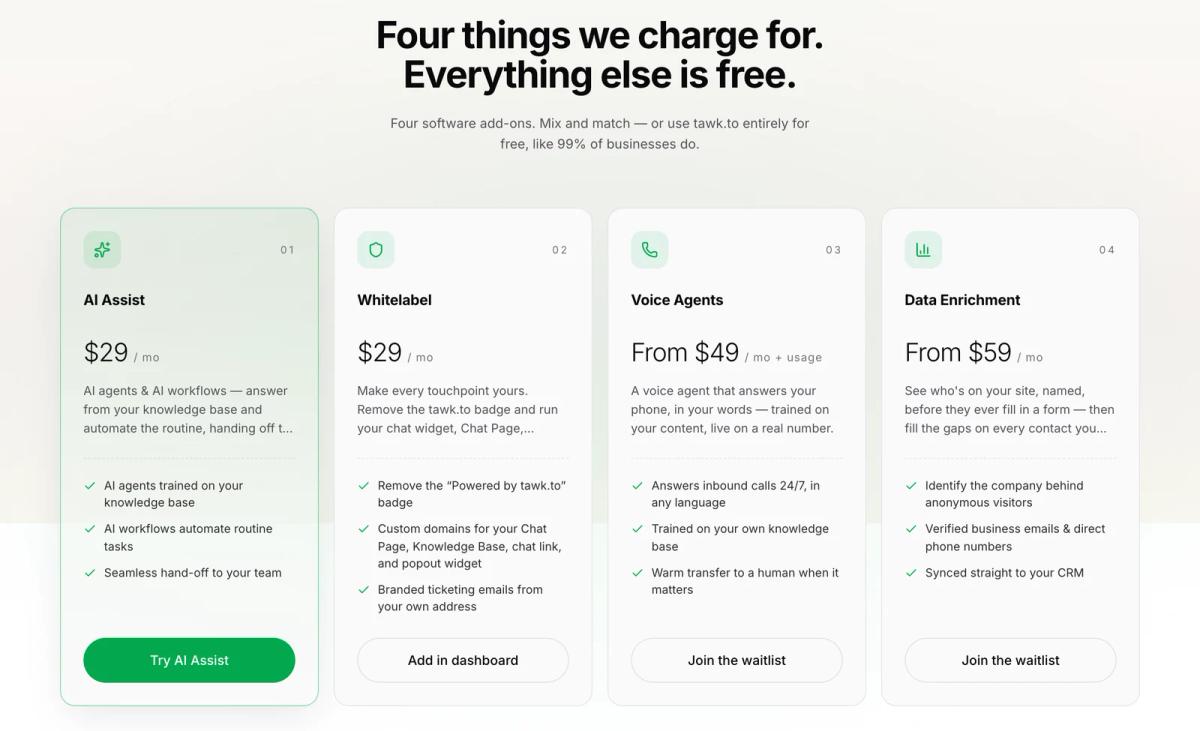
tawk.to's founder explains the model on the company's Why Free page:
"If you would like to remove the tiny 'Powered by tawk.to' branding from our products, we charge $29/month. Don't remove it, and it is free for life."
- ✅ No seat limit, so a growing team doesn't change the bill
- ✅ Ticketing, a knowledge base and a CRM are free too
- ⚠️ Someone still has to answer: without AI Assist, every chat waits for a person
- ⚠️ The badge stays unless you pay for Whitelabel
Choose it if you want live chat on a $0 budget and have people to staff it. Skip it if nobody can watch the inbox; an unanswered chat does more harm than no chat at all.
2. HubSpot free live chat: best if you already use HubSpot CRM
Price (checked 16 Oct 2026): free for up to 2 users. HubSpot's free live chat comes with a no-code chatbot builder, and every conversation is saved to the free CRM, so you can see the whole history of a lead. Service Hub Starter, which removes HubSpot branding from the chat, lists at $20 per seat a month. When we checked it was discounted to $7 a seat on yearly billing ($10 monthly).
HubSpot's AI Customer Agent belongs to Service Hub Professional, which starts at $90 per seat a month on yearly billing, plus a one-time $1,500 onboarding fee.
- ✅ Chats land in the CRM your sales team already uses
- ✅ The free tier is genuinely useful for two people
- ⚠️ The jump from Starter to the AI tier is steep
Choose it if your contacts and deals already live in HubSpot. Skip it if you don't use HubSpot; you would be adopting a CRM just to get a chat window.
3. Crisp: best flat price for a small team
Price (checked 16 Oct 2026): free for 2 seats, with no AI credits. Paid plans are priced per workspace, not per person: Mini $45 a month (4 seats, $5 of AI credits, unlimited data retention), Essentials $95 (10 seats, $25 of AI credits, the AI chatbot, a knowledge base and workflow automation) and Plus $295 (20+ seats, $75 of AI credits and white labelling). Extra agents cost $10 a month each. See Crisp's pricing page.
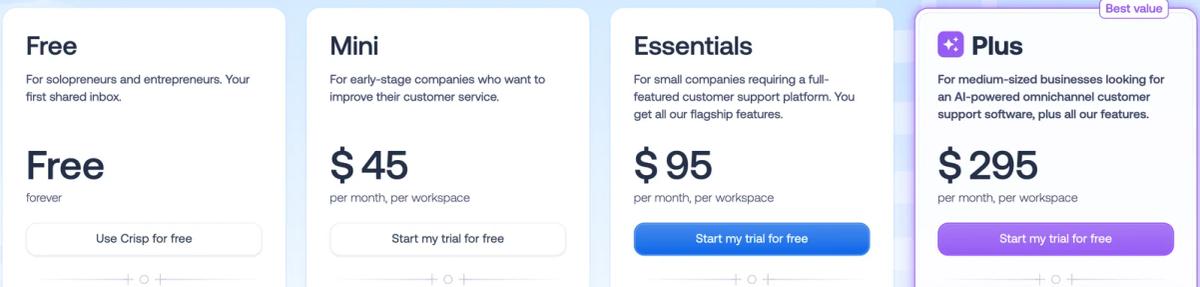
- ✅ One price covers up to 4 people on Mini and 10 on Essentials
- ✅ Shared email inbox from Mini, every channel from Essentials
- ⚠️ The AI chatbot starts on Essentials ($95), and AI usage is metered in credits
Choose it if a small team wants live chat and a shared inbox at a price that doesn't change as you add people.
4. Chatwoot: best open-source chat widget
Price (checked 16 Oct 2026): Chatwoot is open source, so you can host it on your own server for free. Its cloud version has a free Hacker plan (up to 2 agents, 500 conversations a month, live chat only, 30 days of data), then Startups at $19 per agent a month (all channels, 300 Captain AI credits), Business at $39 and Enterprise at $99. Extra Captain AI credits cost $20 per 1,000. Chatwoot says more than 15,000 organisations use it.
- ✅ Self-hosting keeps every conversation on infrastructure you control
- ✅ The AI assistant, Captain, is included in every paid plan
- ⚠️ Self-hosting means you run the updates, backups and uptime
- ⚠️ Cloud pricing is per agent, so it grows with your team
Choose it if data ownership matters more to you than convenience, or you have a developer who likes running services.
5. Smartsupp: free plan with WhatsApp and Messenger
Price (checked 16 Oct 2026): the free plan gives 1 operator, 25 conversations a month and 14 days of history, and already covers live chat, WhatsApp and Messenger. Solo is $17 a month on yearly billing (unlimited conversations, email, 50 AI reply assists), Plus is $25 (3 operators, automated workflows, 250 AI reply assists) and Expert is $83. Its Mira AI agent is sold as a separate plan.
Choose it if you are a one-person shop that gets most enquiries on WhatsApp or Messenger. At 25 conversations a month, the free plan is a trial in practice.
Best paid live chat widgets
6. Text (LiveChat): best for sales chat
LiveChat's pricing page now sells Text plans, from the team behind LiveChat, HelpDesk and ChatBot. Essential is $19 per user a month on yearly billing ($25 monthly) and includes one AI agent with 10 AI resolutions a month. Growth is $79 ($99 monthly) with 200 AI resolutions a month. Extra AI resolutions come in packs of 50 for $49.50, which is about $0.99 each. Website chat, WhatsApp, Messenger, SMS and email share one inbox on every plan, and the widget meets WCAG 2.2 AA accessibility standards. A white-label widget is Enterprise only. See Text's pricing.
Choose it if chat is a sales channel for you, especially on Shopify, and you want a mature agent app. Watch the AI resolutions: 10 a month on Essential runs out in a day on a busy site.
7. Zendesk: best when chat is one channel of a full help desk
Zendesk's cheapest plan, Support Team at $19 per agent a month, is email and ticketing only. Messaging and live chat start on Suite Team at $55 per agent a month on yearly billing, and Suite Professional is $115. Zendesk says AI agents are included in every plan and billed per automated resolution; the pricing page doesn't list the rate. There is a 14-day trial of Suite Professional. See Zendesk pricing.
Choose it if your team works a ticket queue all day across email, chat and phone. Skip it if chat is your only channel; you would pay help-desk prices for a chat window.
8. Tidio: best live chat with an AI add-on for small stores
Price (checked 16 Oct 2026): free for 50 conversations a month, plus 50 one-time Lyro AI conversations. Starter is $24.17 a month on yearly billing ($29 monthly) for 100 conversations, with live chat, ticketing and a live visitors list, and up to 10 seats. Growth starts at $49.17 ($59 monthly). The Lyro AI agent is a separate meter from $32.50 a month for 50 AI conversations, which works out to $0.65 each at that tier. Tidio says its customers average a 75% resolution rate with Lyro. See Tidio pricing.
Choose it if you want a polished live chat app with human agents at the centre and an AI layer you can add later. Our Aivastark vs Tidio page compares the two AI bills in detail.
9. Olark: best for unlimited AI at one fixed price
Olark sells human live chat at $29 per agent a month, with no AI, and a Standard AI Website Agent at $400 a month billed yearly ($4,800 a year) with unlimited conversations, one human seat and no token limits or overages. Extra human agents cost $29 each. Olark has been around since 2009 and says 12,000+ businesses use it.
Olark's pricing page states the argument for flat AI pricing better than most:
"Token pricing creates a bad incentive: the more your agent helps, the more you pay, so you start rationing your own success."
Choose it if you have heavy chat volume and $400 a month is cheaper than what per-resolution pricing would cost you. Below a few hundred AI conversations a month, it is the most expensive way to get an AI agent on this list.
Best AI chat widgets
10. Aivastark: best AI chat widget at a flat monthly price
We make Aivastark, so weigh this section accordingly. The prices are on our pricing page.
Aivastark is an AI agent that answers on your website widget and, from the Starter plan, on WhatsApp, Instagram and Facebook Messenger, all from one knowledge base and one inbox. You train it on your website, documents and FAQs. It answers in 80+ languages and hands the conversation to your team, with the full thread, when it can't answer.
Price (checked 16 Oct 2026):
- Free: $0, permanent, no card: 300 credits a month, 1 website, your name, colours, logo and persona, and product, pricing and booking cards
- Solo: $12 a month ($108 a year): 1,000 credits, human handoff and email escalation, a lead form and lead webhook
- Starter: $39 a month ($348 a year): 5,000 credits, 3 seats, 2 websites, WhatsApp, Instagram, Messenger and email, gpt-4o with image understanding, and agent tools for calendars, Shopify, webhooks and MCP
- Growth: $129 a month (25,000 credits, 5 websites) and Scale: $319 a month (75,000 credits, 15 websites, hide the badge)
A standard AI reply costs 1 credit (a gpt-4o reply costs 10), so the Starter plan's 5,000 credits cover about 5,000 standard replies. Past the allowance, paid plans keep answering and bill overage at $4.00 down to $1.20 per 1,000 credits, depending on the plan.
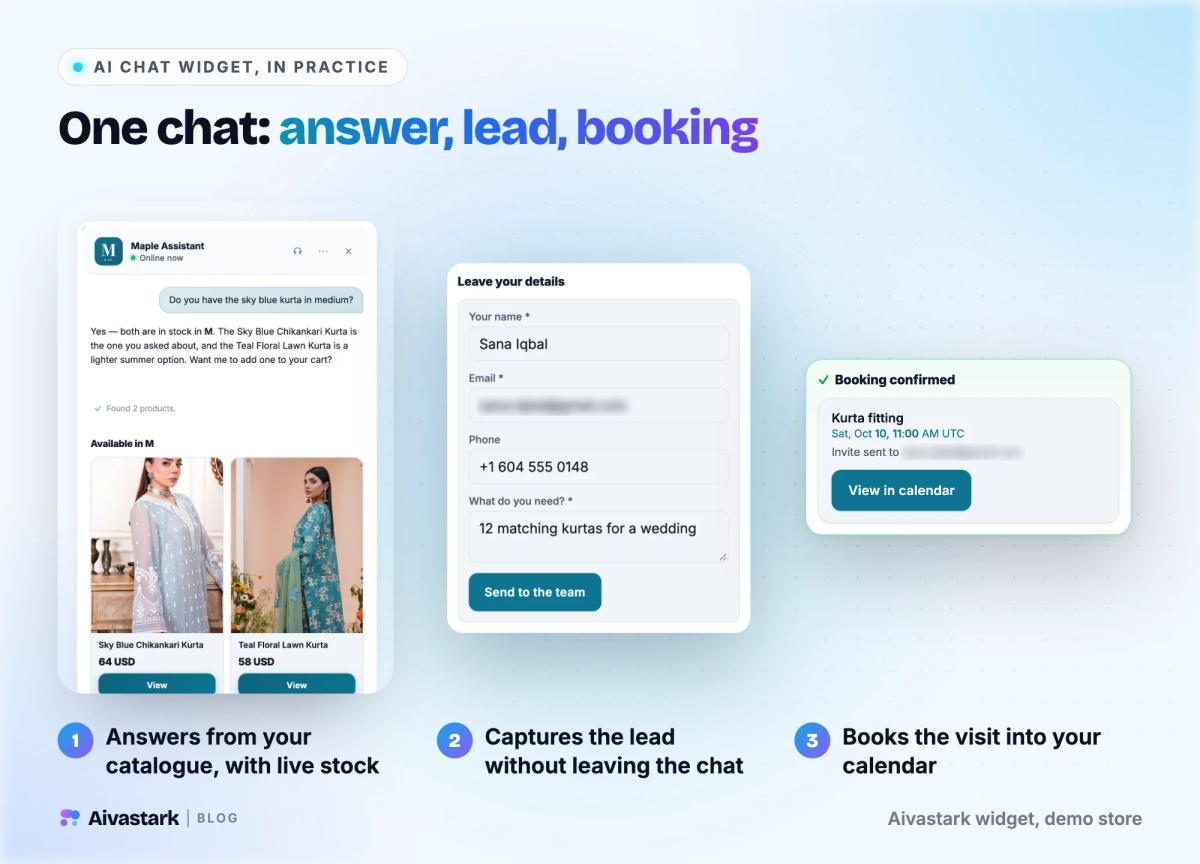
- ✅ AI replies are included up to the plan's allowance, with a published overage rate, so you know the bill in advance
- ✅ The free plan doesn't expire and needs no card
- ⚠️ It doesn't answer phone calls
- ⚠️ You can't pick any model you like: Aivastark runs the standard model, and from Starter you can switch a project to gpt-4o
- ⚠️ A small "Powered by Aivastark" badge shows until the Scale plan
Choose it if you want an AI agent to answer first on your website and messaging apps at a price you know in advance. Setup is one script tag, the WordPress plugin or the Shopify app; see the chat widget setup page.
11. Intercom Fin: best AI agent if you already run Intercom
Price (checked 16 Oct 2026): Fin costs from $0.99 per outcome, plus Intercom seats: Essential $29 per seat a month on yearly billing, Advanced $85 and Expert $132. Every plan includes unlimited live chat. If you use another help desk, Fin is sold on its own at $0.99 per outcome with no seats. See Intercom pricing.
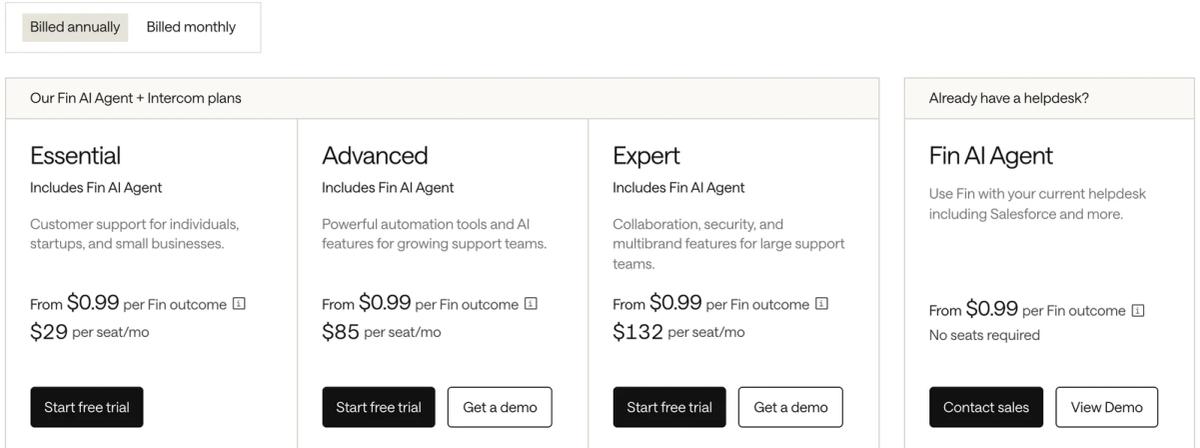
At 1,000 outcomes a month the AI line alone is $990, on top of seats. Fin is very good inside Intercom's inbox, and if your team already lives there, switching rarely pays off. Read what Intercom Fin is or the Aivastark vs Intercom Fin comparison.
12. Chatbase: best if you want to choose the AI model
Price (checked 16 Oct 2026): Hobby is $32 a month on yearly billing ($40 monthly) for 700 message credits, 2 members and one AI agent. Standard is $120 (4,000 credits, 3 members, a help desk inbox, voice and API access) and Pro is $400 (15,000 credits). Extra credits cost $40 per 1,000, and removing the "Powered by Chatbase" branding is a separate $1,188 a year. See Chatbase pricing.
Choose it if you want to choose which AI model runs your agent, or you need phone voice. Watch the credits: at $40 per 1,000 extra replies, a traffic spike gets expensive. Compare it with Aivastark on our Aivastark vs Chatbase page.
What does a chat widget cost a 3-person team?
Most comparisons list the entry price and stop. The useful number is what your team pays, so we took the cheapest plan on each tool that seats three people.
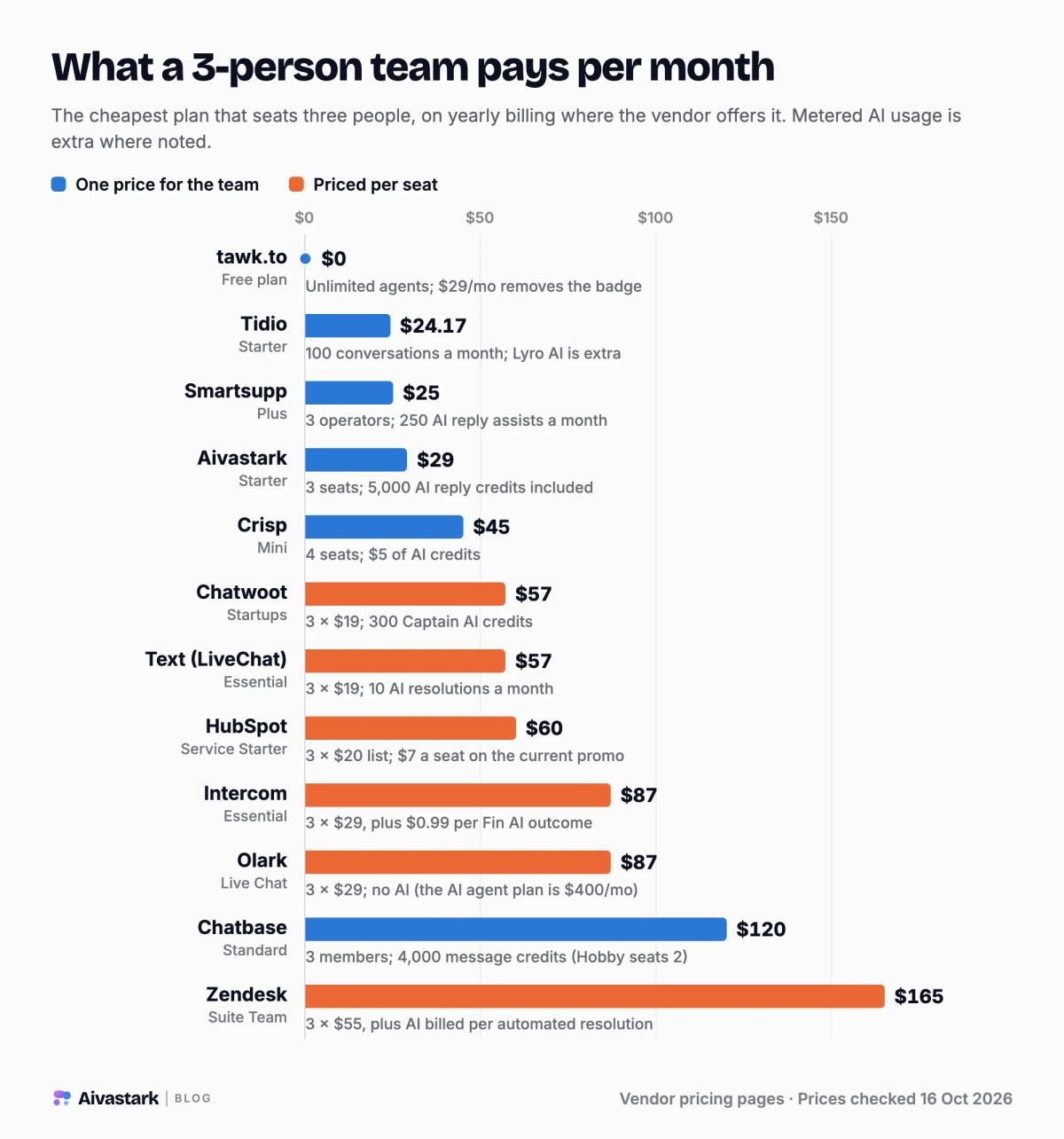
| Tool | Plan that seats 3 | Per month | What the AI costs on top |
|---|---|---|---|
| tawk.to | Free | $0 | AI Assist add-on, $29/mo |
| Tidio | Starter (10 seats) | $24.17 | Lyro from $32.50/mo for 50 conversations |
| Smartsupp | Plus (3 operators) | $25 | 250 AI reply assists included; Mira AI agent separate |
| Aivastark | Starter (3 seats) | $29 ($39 monthly) | 5,000 AI reply credits included |
| Crisp | Mini (4 seats) | $45 | $5 of AI credits included |
| Chatwoot | Startups, 3 × $19 | $57 | 300 Captain AI credits included |
| Text | Essential, 3 × $19 | $57 | 10 AI resolutions included, then $49.50 per 50 |
| HubSpot | Service Starter, 3 × $20 | $60 ($21 on promo) | AI Customer Agent needs Professional |
| Intercom | Essential, 3 × $29 | $87 | $0.99 per Fin outcome |
| Olark | Live Chat, 3 × $29 | $87 | No AI; the AI agent plan is $400/mo |
| Chatbase | Standard (3 members) | $120 | 4,000 message credits included |
| Zendesk | Suite Team, 3 × $55 | $165 | Billed per automated resolution |
The AI line is where the bills split apart
Seats are predictable; AI usage isn't. Take a site whose AI handles 1,000 conversations a month, with five AI replies in each:
- Intercom Fin: if every conversation counts as an outcome, $990 a month plus seats.
- Text Essential: 10 resolutions are included; the other 990 need 20 packs of 50, about $990 a month.
- Tidio Lyro: at the $0.65 rate of its entry tier, about $650 a month before volume discounts.
- Olark AI: $400 a month, whatever the volume.
- Chatbase Standard: at one credit per reply, 5,000 replies against 4,000 included credits, so $120 plus $40 for the extra 1,000.
- Aivastark Starter: 5,000 standard replies fit inside the 5,000 included credits, so $39 a month ($29 on yearly billing).
These are illustrations, not quotes. Real bills depend on how each vendor counts an outcome, a resolution or a credit, and on your conversation length. The pattern holds, though: per-resolution pricing grows with your traffic, flat pricing doesn't.
How to add a chat widget to your website
Most chat widgets install without a developer, in one sitting:
- Choose who answers first. A person (live chat) or an AI agent with a person as backup. This decides the tool.
- Install the widget. Paste the vendor's script tag before the closing body tag, or use its WordPress plugin, Shopify app, or the custom-code setting in Wix or Webflow.
- Brand it. Set the name, colours, logo, greeting and opening hours, and add an offline form for when nobody is around.
- Train the AI on your content. For an AI widget, point it at your website, help docs and FAQs, then test it with ten real questions customers have asked you.
- Set up the handoff. Decide who gets notified when the AI hands over, and where: the vendor's inbox, email or Slack.
- Read the first 50 conversations. Fix wrong answers at the source, add missing pages to the knowledge base, and watch where visitors drop off.
For a step-by-step walkthrough with an AI agent, see how to add an AI chatbot to your website.
What to look for in a chat widget in 2026
- Who answers first. It's the biggest decision, and it changes the cost of everything else.
- How the bill grows. Per seat grows with your team, per resolution with your traffic, and flat plans grow only when you change plans.
- The cost of removing the badge. $29 a month on tawk.to, Service Starter on HubSpot, the $295 Plus plan on Crisp, $1,188 a year on Chatbase, Enterprise on Text, and the $319 Scale plan on Aivastark.
- Channels beyond the website. If your customers message you on WhatsApp or Instagram, check that those land in the same inbox. They do on every Text plan, on Smartsupp's free plan, on Chatwoot's paid plans and on Aivastark from Starter.
- How long history is kept. It ranges from 7 days (Aivastark Free) and 14 days (Smartsupp Free) to 30 days (Chatwoot Hacker) to unlimited (tawk.to, Crisp Mini).
- Languages. AI widgets can answer in the visitor's language without extra staff; Aivastark detects 80+ from the first message. See how multi-language AI support works.
Which chat widget should you choose?
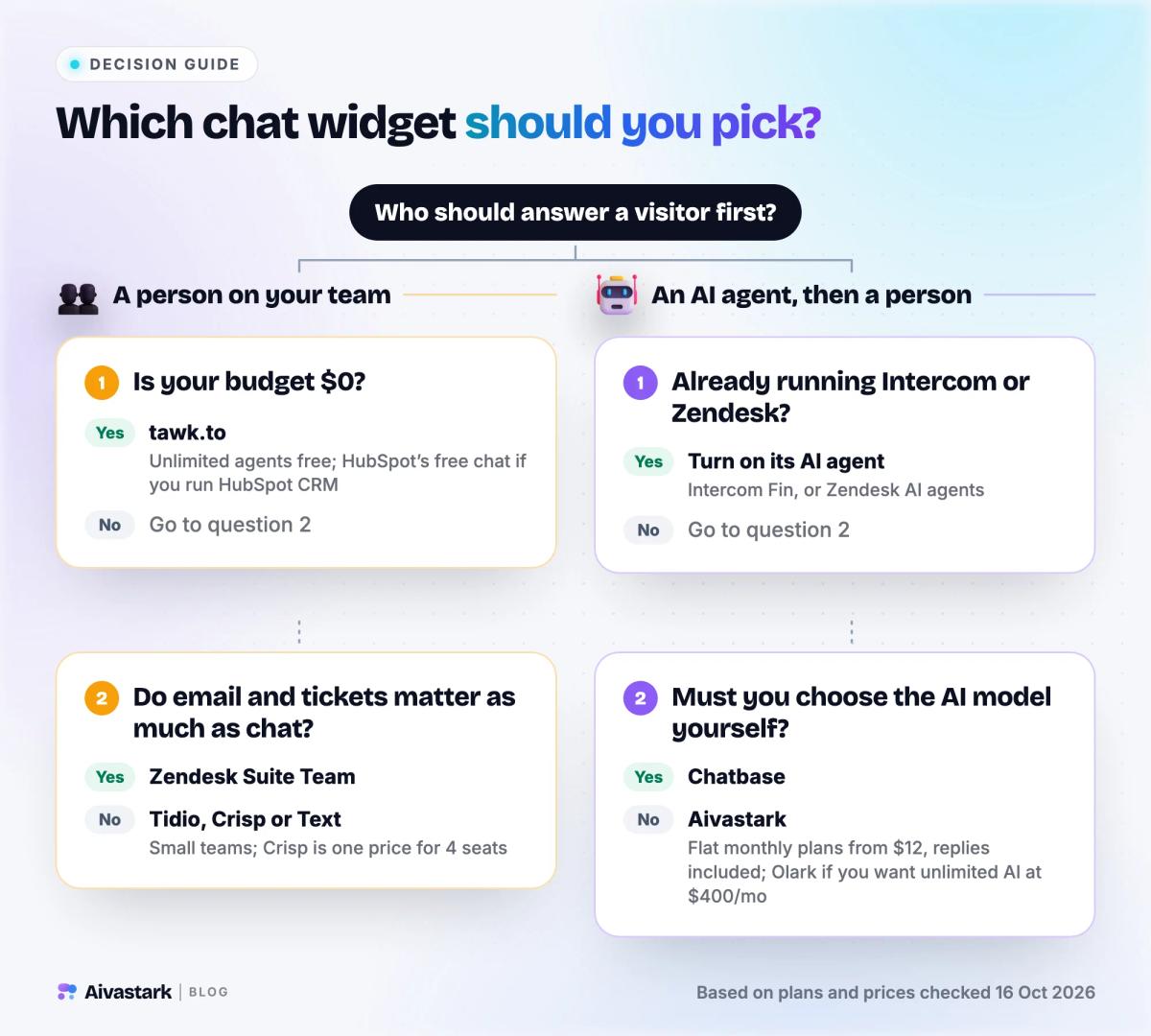
- A $0 budget and a person to answer: tawk.to.
- Your sales team lives in HubSpot: HubSpot's free live chat.
- A small team that wants one predictable price: Crisp.
- You want to own the data: Chatwoot, self-hosted.
- Support runs on tickets across email, chat and phone: Zendesk.
- Chat is a sales channel, especially on Shopify: Text.
- You already run Intercom: turn on Fin.
- Heavy volume and a budget for unlimited AI: Olark's AI agent.
- You must choose the AI model: Chatbase.
- You want an AI agent to answer first at a flat monthly price: Aivastark. Start on the free plan and add WhatsApp and Instagram when you need them.
Still comparing AI agents specifically? Our best AI chatbots for customer support guide goes deeper on resolution quality, and 9 Intercom alternatives covers help-desk replacements.
Frequently asked questions
What is the best chat widget for a website in 2026?
It depends on who answers the chat. For live chat staffed by your team on a $0 budget, tawk.to is the strongest choice: it is free with unlimited agents and chats. For a small team that wants one flat price, Crisp starts at $45 a month per workspace. For an AI agent that answers first at a flat price, Aivastark starts at $12 a month, with a free plan of 300 AI credits a month.
What is the best free chat widget for a website?
tawk.to is the best free chat widget: unlimited agents, chats and history at no cost, with $29-a-month add-ons to remove its badge or add AI. HubSpot’s free live chat suits teams already on HubSpot CRM, for up to 2 users. Crisp’s free plan covers 2 seats, and Chatwoot is open source, so you can host it yourself for free.
How much does a website chat widget cost?
From $0 to a few hundred dollars a month. In October 2026 the cheapest plan that seats three people cost $0 on tawk.to, $24.17 on Tidio, $29 on Aivastark (yearly billing), $45 on Crisp, $57 on Text and Chatwoot, $87 on Intercom and Olark, $120 on Chatbase and $165 on Zendesk. Most tools bill AI usage on top, from $0.99 per Intercom Fin outcome to Olark’s flat $400 a month.
What is the difference between live chat and an AI chat widget?
With live chat, a person on your team answers every message, so replies depend on someone being online. An AI chat widget answers first from your own content, at any hour and in the visitor’s language, and hands the conversation to a person when it can’t help. Many tools now do both: the AI handles routine questions and your team takes the rest.
Can I remove the "Powered by" badge from a chat widget?
Usually for a fee. tawk.to charges $29 a month and Chatbase $1,188 a year, and HubSpot removes its branding from live chat on Service Hub Starter. Crisp includes white labelling on its $295 Plus plan, Text offers a white-label widget on Enterprise, and Aivastark lets you hide its badge on the $319 Scale plan.
Which chat widgets also answer WhatsApp and Instagram messages?
Text puts website chat, WhatsApp, Messenger, SMS and email in one inbox on every plan. Smartsupp’s free plan covers WhatsApp and Messenger. Chatwoot’s paid cloud plans include all channels. Aivastark answers WhatsApp, Instagram and Facebook Messenger from its $39 Starter plan, with the same AI agent and inbox as the website widget.
Do I need a developer to add a chat widget to my website?
No. The tools in this comparison install with one script tag pasted before your site’s closing body tag, or with a plugin or app. WordPress plugins, Shopify apps and the custom-code settings in Wix and Webflow add it without editing theme code. AI widgets add one more step: pointing the agent at your website and documents so it can answer.
Is an AI chat widget worth it for a small business?
If your team can’t answer chats within a minute or two whenever visitors arrive, usually yes. An AI widget answers instantly, captures the lead while the visitor is still on the page, and passes the hard questions to a person. Start on a free plan, such as Aivastark’s 300 AI credits a month, and read the first 50 conversations before you pay.
Sources