The AI agent for online stores that answers “where’s my order?” and sells while it does
Looks up the real order on Shopify or WooCommerce, files return requests, shows live products and adds them to the cart, on your site and in your DMs.
Free plan for website answers · Shopify and WooCommerce tools, product cards and channels from Starter

Maple & Co.
AI support agent · any hour
Hi, where's my order? It's #4821.
Order #4821 left the warehouse yesterday and is out for delivery tomorrow. Here's the live tracking:
Order #4821
Shipped- Ordered
- Packed
- Shipped
- Out for delivery
With the carrier · arriving tomorrow
Track parcelGreat. Do you have the matching tote in oak?
We do, and it's in stock. Want me to add one to your cart?
Studio Tote · Oak
$48In stock
Studio Tote · Walnut
$483 left
Add the oak toteNot nowAdded. Your cart has the oak tote at $48; here's your checkout link whenever you're ready.
What is an AI chatbot for ecommerce?
Aivastark is an AI customer-support agent for online stores. It looks up a shopper's real order on Shopify or WooCommerce and answers “where is my order?” with the carrier tracking, files return and exchange requests, changes a delivery address before the parcel ships, shows live products from your catalogue and adds them to the cart, and answers shipping, sizing and policy questions from your own content. It works on your website, WhatsApp, Instagram and Facebook Messenger in 80+ languages, and hands the conversation to your team when a shopper asks for a person.
- answers shoppers on every channel you connect
- 24/7answers shoppers on every channel you connect
- order, stock and price lookups from your store
- Liveorder, stock and price lookups from your store
- languages shoppers can write in
- 80+languages shoppers can write in
- plan to start, no card
- Freeplan to start, no card
What shoppers ask your AI agent
Most messages a store gets are the same handful of questions, and most arrive after your team has gone home. The agent answers them from your store and your own content, any hour, and leaves the judgement calls to your people.
“Where is my order?”
Looks the order up on Shopify or WooCommerce and answers with where the parcel is and the carrier tracking link, any hour.
Returns and exchanges
Explains your returns window from your policy, lists what's still returnable on the order and files the return, refund or exchange request for your team.
Shipping, delivery and cash on delivery
Delivery times, charges, countries and payment options from the policies you add; COD orders placed on WooCommerce when you enable it.
“Is it in stock in my size?”
Live variants, stock and prices from your catalogue, shown as product cards, with the chosen size or colour added to the cart.
Sizing and fit
Answers from the size guides and fit notes you upload, so the right size goes in the cart the first time.
Discounts and offers
Answers “is there a discount?” from the offers you publish, in the words shoppers use, and hands your checkout link back.
From “where’s my order?” to a tracking link in one message
The most common ticket in ecommerce needs no ticket. The agent reads the order from your Shopify or WooCommerce store the moment the shopper gives the number, answers with where the parcel is and the carrier’s tracking link, and only asks for the email on the order when the shopper wants the items, the total or an address change.
- Order number alone: where the parcel is and the tracking link (Shopify).
- Email on the order too: items, total, delivery address, address changes and return requests.
- Shipped already? It says so plainly and points the shopper to the carrier instead of guessing.
One question, one lookup
Example- 1OrderedShopper asks “where's my order?” and gives the number.
- 2PackedThe agent reads the order from your store, no email needed on Shopify.
- 3ShippedIt replies with where the parcel is and the carrier tracking link.
- 4Out for deliveryThe shopper has the answer; nobody on your team typed a word.
Live on your store in three steps
- 1
Connect your store
Install the Shopify app or connect WooCommerce from the Tools page. The agent can now look up orders, products, stock and carts for the shopper it's talking to.
- 2
Add your policies and guides
Paste your website URL and upload your shipping policy, returns policy, size guides and FAQs. Aivastark builds the knowledge base it answers from.
- 3
Go live where shoppers are
Paste one script tag on your store, and add WhatsApp, Instagram or Messenger if shoppers message you there (Starter). Every conversation lands in one inbox.
Looks up the real order, not a canned reply
On Shopify, an order number alone is enough for the agent to say where the parcel is and share the carrier tracking link. With the email on the order, or a signed-in shopper, it also sees the items, the total and the delivery address, can change that address before the order ships, and can file a return, refund or exchange request once the shopper confirms. It never issues a refund or cancels an order itself.
Order status and tracking
Starter+Shopify: status and tracking from the order number. WooCommerce: status, tracking and items with the order number and email.
Address change before shipping
Starter+Updates the delivery address on an unfulfilled order after the shopper confirms.
Return, refund and exchange requests
Starter+Lists what's returnable and files the request for your team; money never moves without you.
Order requests for any store
All plansWithout Shopify or WooCommerce, it collects the order details and passes them to your team.
Order lookup
ExampleWith the order number
- Where the parcel is
- Carrier tracking link
With the email on the order
- Items, total and delivery address
- Change the address before it ships
- File a return, refund or exchange request
Sells from your live catalogue
Ask for a product and the agent searches your Shopify or WooCommerce catalogue, shows product cards with live prices and stock, resolves the shopper's size or colour to a real in-stock variant and adds it to the cart once they confirm. It can suggest complementary products after an add-to-cart and hand over the checkout link, and it remembers an open cart so a returning shopper can pick up where they left off.
Product cards
Starter+Live products, variants, prices and stock from Shopify or WooCommerce, shown inside the chat.
Add to cart and checkout
Starter+Adds the chosen variant to the cart after confirmation and returns the checkout link.
Complementary products
Starter+Suggests related items after a product question or an add-to-cart.
Cash on delivery on WooCommerce
Starter+Places a COD order when you switch ordering on; other stores pass the order to your team.
Product cards
ExampleStudio Tote · Oak
$48In stock
Studio Tote · Walnut
$483 left
Added to cart · Studio Tote, Oak · checkout link ready
Complete the look: Studio Pouch · Oak, $18
Answers policy questions from your store, not the internet
Shipping times and charges, returns windows, size guides, care instructions and the offers you're running all come from the content you give it: your website, your policy pages, your PDFs and the FAQs you write. Where your content is thin it can draw on general knowledge, and Answer Gaps shows you what shoppers asked that your content couldn't answer.
Website crawl
All plansReads and indexes your store pages, policies included.
Your documents
All plansPDF, Word (DOCX), TXT or Markdown: size guides, shipping tables, care sheets.
Hand-written FAQs
All plansAdd the answers your support team gives every day.
Answer gaps
Starter+See what shoppers asked that your content couldn't answer, with drafted answers to approve.
Store knowledge
ExampleAnswer gap
"Do you ship to the Canary Islands?"
Draft answer ready to approve
Answers in the shopper’s DMs, in their language
The same agent answers on your website, WhatsApp, Instagram DMs, Facebook Messenger and Telegram, replies in the language each shopper writes in, including Roman Urdu and Urdu script, and transcribes voice notes to answer them in text. An optional nudge follows up with a shopper who goes quiet on WhatsApp, Instagram or Messenger within 24 hours of their last message.
WhatsApp, Instagram, Messenger and Telegram
Starter+The same answers, orders and product cards on the apps shoppers already use.
80+ languages
All plansReplies in the shopper's language; limit it to the ones your team speaks.
Voice notes
Starter+Transcribed and answered in text on WhatsApp, Instagram, Messenger and Telegram.
Follow-up nudges
Starter+An optional nudge when a shopper goes quiet, within 24 hours of their last message.
Shopper messages
ExampleYour team stays in control
With human handoff on, a shopper who asks for a person, sounds upset or still isn't helped after a few tries is passed to your team in one inbox with the whole thread and the order details already looked up. Tickets open for anything that needs follow-up and can sync to Zendesk, Freshdesk or HubSpot, and shoppers can rate the conversation when it ends.
Human handoff
Solo+Passes shoppers to your team on the triggers you choose; the agent steps back while a teammate replies.
One inbox
All plansEvery channel in one list, with canned replies and the shopper's order context beside the conversation.
Tickets and sync
Starter+Opens a ticket with response targets and pushes it to Zendesk, Freshdesk, HubSpot or a webhook.
CSAT
Starter+Shoppers rate the conversation when it ends.

Inbox
ExampleNew handoff · Maple & Co.
Summary: order #4790 marked delivered on Friday, shopper says it never arrived; second incident. Order details attached.
Connect the store, run the inbox, meet shoppers in their DMs
These are the actual screens: the Tools page where Shopify connects, the inbox your team works from, and the channels your shoppers already use.
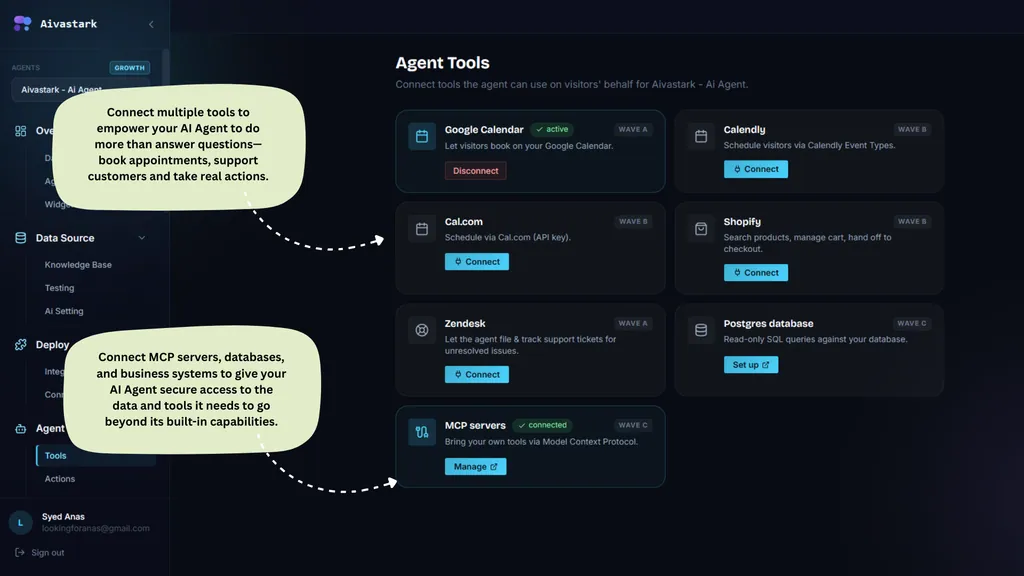
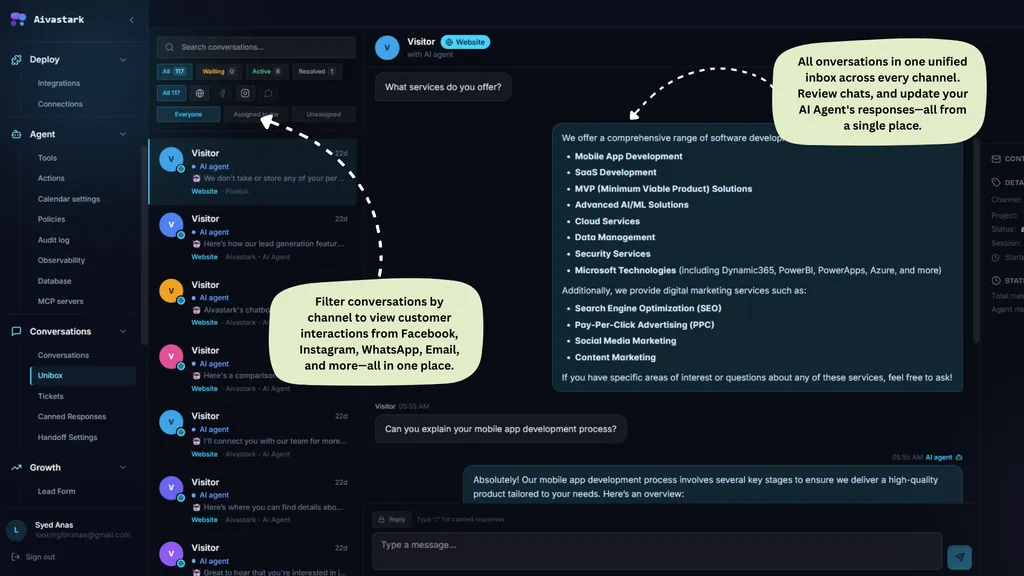

Works with Shopify and WooCommerce, installs anywhere
Shopify
Official app. Products, variants, stock, carts and checkout links; order status and tracking; address changes before shipping; return, refund and exchange requests.
WooCommerce
Products and stock, carts, order status with the order number and email, address changes, return requests logged for your team, and cash-on-delivery orders when you enable ordering.
Any other store
Install the widget on BigCommerce, Squarespace, Webflow, Wix or any site with one script tag. The agent answers from your content and passes order requests to your team; live order and product lookups need Shopify or WooCommerce.
An AI sales rep for your Shopify store
From question to checkout: the agent answers with live stock and prices from Shopify, suggests products and helps shoppers buy, any hour.
How the Shopify integration worksWhat it doesn't do
Choosing an agent for your store means knowing its limits. Aivastark answers shoppers and files their requests; it does not issue refunds, cancel orders, integrate with couriers or send email campaigns.
Requests, not refunds
It files return, refund and exchange requests and tells the shopper your team will review them. It never issues a refund, cancels an order or moves money.
Live lookups need Shopify or WooCommerce
On other platforms the widget answers from your content and collects order requests for your team. There is no BigCommerce, Magento or Squarespace integration.
No courier integration
Tracking links come from the order on your store. Delivery times, charges and areas come from the content you add, not from a courier API.
Messages, not phone calls
It doesn't answer phone calls or send SMS, and it doesn't send abandoned-cart email campaigns. It answers on website chat, WhatsApp, Instagram, Messenger, Telegram and email.
AI agent vs email support and a help centre
| For your store | Email support | Help centre | Aivastark |
|---|---|---|---|
| Answers shoppers after hours | Next business day | If they find the article | Answers from your content and your store, any hour |
| Looks up the actual order | By hand | No | Live on Shopify or WooCommerce (Starter) |
| Files return requests | By hand | A form, maybe | In the chat, after the shopper confirms (Starter) |
| Shows products and adds to cart | No | No | Live product cards and cart (Starter) |
| WhatsApp, Instagram, Messenger | Separate inboxes | No | Yes, one inbox (Starter) |
| Languages | Your team's | What you translated | 80+ |
| Hands off to a person | It is a person | No | Yes, with the order context attached (Solo) |
Already shortlisting a Shopify helpdesk?
Both of these bill per conversation or per AI resolution. Each page states plainly what the other product is better at, with sourced and dated pricing.
Aivastark vs Gorgias
$0.90–$1.00
per Gorgias AI interaction, which also counts as a ticket
Aivastark and Gorgias compared for Shopify stores: AI pricing, seats, channels and order actions. Gorgias bills AI per interaction; Aivastark is flat monthly.
Aivastark vs Tidio
$39 vs $700
about 1,000 AI conversations a month, at five replies each
Aivastark vs Tidio on AI pricing, channels and branding. Tidio's Lyro costs about $0.58–$0.78 per AI conversation; Aivastark's $39 plan includes 5,000 replies.



See every comparison Each one states what the other product is better at, with sourced and dated pricing.
Product names and logos belong to their owners and are shown only to identify the products compared; no affiliation or endorsement is implied.
Which plan an online store needs
Start free with answers from your content. Add Solo when you want your team to take over conversations, and Starter to connect Shopify or WooCommerce and your messaging channels. Every paid plan starts with a 7-day free trial.
Free
$0forever
Answer shoppers on your website
- Website chat widget
- Knowledge base from your store and documents
- 80+ languages
- Order requests passed to your team
- One inbox
Solo
$12/month
Bring your support team in
- Human handoff
- Email alerts with a summary
- Pre-chat form
- Leads to your systems
Starter
Connects your store$39/month
Connect your store and your DMs
- Shopify and WooCommerce tools: orders, returns, products, cart
- Product cards and checkout links
- WhatsApp, Instagram, Messenger and Telegram
- Tickets, CSAT and Visitor Lenz analytics
- Voice notes and follow-up nudges
Questions online stores ask
What is an AI chatbot for ecommerce?
An AI chatbot for ecommerce is software that answers shoppers' questions in natural language on a store's website and messaging channels, around the clock. A capable one does more than answer: it looks up the shopper's real order, shows products from the live catalogue, adds to the cart and passes the conversation to a person when needed. Aivastark does all of that from your own content and your Shopify or WooCommerce store.
How does it answer “where is my order?” accurately?
By looking the order up on your store rather than guessing. On Shopify the order number alone returns where the parcel is and the carrier tracking link; with the email on the order it also returns the items, total and delivery address. On WooCommerce it needs the order number and the email the order was placed with, and only returns an order whose email matches.
Can it process returns and refunds?
It files them; it does not process them. The agent lists what is still returnable on the shopper's order, explains your returns window from your policy, and files a return, refund or exchange request once the shopper confirms. Your team reviews it in your store. The agent never issues a refund, quotes a refund date or cancels an order.
Does it work with Shopify, WooCommerce and BigCommerce?
Shopify and WooCommerce are integrated: products, carts, orders and returns. On BigCommerce, Magento, Squarespace, Webflow, Wix and any other platform you can install the widget with one script tag, and the agent answers from your content and collects order requests for your team, but it cannot look up orders or products there.
Can shoppers add products to the cart in the chat?
Yes, from the Starter plan with a connected Shopify or WooCommerce store. The agent shows product cards with live prices and stock, resolves the shopper's size or colour to a real in-stock variant, adds it to the cart after they confirm and hands back the checkout link. On Shopify it can also suggest complementary products.
Does it recover abandoned carts?
Inside the conversation, yes: the agent knows when a shopper has an open Shopify cart, can hand them the link to resume checkout, and can send an optional follow-up nudge on WhatsApp, Instagram or Messenger within 24 hours of their last message. It does not send abandoned-cart email campaigns; use your email tool for those.
What about address changes and cancellations?
The agent can change the delivery address on a Shopify or WooCommerce order before it ships, after confirming the new address with the shopper. Once the parcel has shipped, the carrier owns it and the agent says so. It does not cancel orders; a cancellation request is passed to your team.
Will it answer in Spanish, Arabic or Urdu?
Yes. The agent handles 80+ languages and replies in the language each shopper writes in, including Spanish, Arabic, Mandarin, Urdu and Roman Urdu. Voice notes on WhatsApp, Instagram, Messenger and Telegram are transcribed and answered in text. You can limit it to the languages your team supports.
Can it handle Black Friday volume?
Paid plans never stop answering. Each plan includes a monthly credit allowance, and past it the excess bills as overage at the plan's published per-thousand-credit rate, so a busy weekend does not switch the agent off. The Free plan stops at its allowance because it has no card on file.
How does it handle angry shoppers?
With human handoff on, a shopper who asks for a person, sounds upset or still isn't helped after a few tries is passed to your team with the whole thread and the order details already looked up, and your team gets an email alert. Until a teammate replies the agent stays polite and factual; it never invents a refund or a delivery date.
How is this different from Gorgias or Tidio?
Gorgias is a full ecommerce helpdesk with deep return and refund workflows worked inside the ticket; Tidio bills Lyro per conversation. Aivastark is an AI agent on the front line at a flat monthly price with a permanent free plan, and a lighter inbox behind it. Our comparison pages state what each is better at, with sourced and dated pricing.
How long does setup take for a store?
For a typical store, under 5 minutes to a live chat widget: add your URL, let it crawl, upload your shipping and returns policies, and paste one script tag. Connecting Shopify or WooCommerce is a separate step from the Tools page, and WhatsApp or Instagram from the Channels page.
Keep exploring
- Shopify integrationOrders, returns, products and cart, from the official app.
- WooCommerce integrationCatalogue, orders, returns and cash-on-delivery ordering.
- WhatsApp AI for Pakistani storesRoman Urdu, voice notes and COD on WhatsApp and Instagram.
- AI sales agentLead capture, scoring and routing for any business.
Answer “where’s my order?” at midnight, and sell the matching tote while you’re at it.
- Free plan, no card
- 7-day trial on paid plans
- Live in under 5 minutes